 Traders Window
Get your alerts on your phone
Step away from the desk and your alerts still reach you. Traders Window sends them through ntfy, a free, open-source notification app. No account, no sign-up, about three minutes to set up.
-
Install ntfy on your phone
Search the App Store or Google Play for ntfy. Pick the one called “ntfy – Push notifications via REST” by Philipp Heckel, with a green icon. When it asks, allow notifications, or the alerts won't show.
Links for every platform are on the official ntfy page.
ntfyPush notifications via RESTPhilipp HeckelGet -
Create your topic in Traders Window
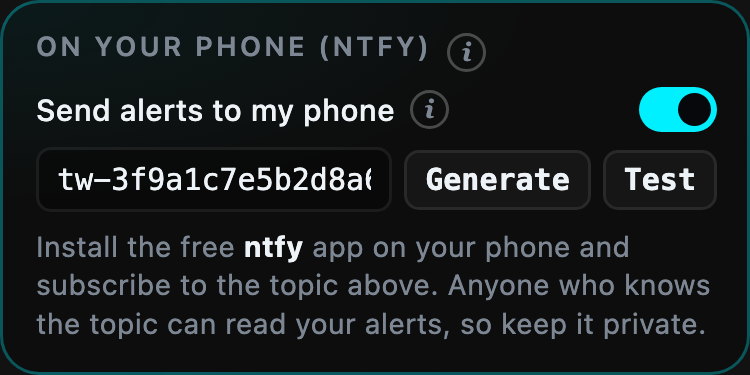
On your Mac, hover the widget, click the gear and open Alerts. Scroll down to On your phone (ntfy).
Click Generate to create your topic, a private channel name like tw-3f9a1c7e…. Then turn on Send alerts to my phone.
-
Subscribe to the same topic on your phone
In ntfy, tap +, type the topic exactly as it appears on your Mac and tap Subscribe. Leave the server as the default, ntfy.sh.
Subscribe to topic tw-3f9a1c7e5b2d8a60 Server: ntfy.sh Subscribe -
Send a test
Back on the Mac, click Test. Within a few seconds your phone should show a notification from Traders Window.
✅ Traders WindowTest: your alerts will arrive here.now
What reaches your phone
Every alert that makes the widget pulse is also sent to your phone:
- price moves you set, in $, % or σ;
- funding flipping sign;
- a wave of liquidations on one of your coins;
- unusual volume;
- with an account connected: a position getting close to liquidation, and hitting your daily loss limit. These two arrive as urgent notifications.
Each alert is sent at most once a minute, so a busy market won't flood your phone.
Keep your topic private
A topic works like a password: anyone who knows it can read the alerts sent to it. The one Traders Window generates is long and random, so it can't be guessed. Don't post it in screenshots or chats. If it leaks, click Generate again and subscribe to the new one.
Alerts contain only the alert text, for example “BTC: +$120.00 from $83,250.00”. Position alerts name the coin and how far it is from liquidation. API keys and balances are never sent.
If nothing arrives
Check the topic
It has to match exactly, character for character. The easiest check: open the topic in ntfy and compare it with the one in Traders Window.
Check notifications
On iPhone: Settings → Notifications → ntfy → Allow Notifications. Also check that a Focus mode isn't silencing it.
Check the switch
Send alerts to my phone must be on. The Test button works even when it's off; real alerts don't.